---
title: How Do I Update My State and Federal Tax Withholdings in isolved?
description: Learn how to update your state and federal tax withholdings in iSolved using the Tax Wizard. Follow these steps to review and adjust your withholding elections quickly and accurately.
---
[Skip to content](https://resources.candoorhcm.com/help-center/update-my-state-and-federal-tax-withholdings#main-content)
English
Show submenu for translations
[More support](https://resources.candoorhcm.com/help-center/kb-tickets/new?hsLang=en)
[](https://resources.candoorhcm.com/help-center?hsLang=en)
- [Blog](https://blog.candoorhcm.com/)
- [Home](https://candoorhcm.com/)
- Solutions
Show submenu for Solutions
- [Payroll](https://candoorhcm.com/payroll/)
- [Tax Pay](https://candoorhcm.com/tax-pay/)
- [Time and Attendance](https://candoorhcm.com/time-attendance/)
- [Attract and Hire](https://candoorhcm.com/attract-hire/)
- [Employee Onboarding](https://candoorhcm.com/employee-onboarding/)
- [Employee Offboarding](https://candoorhcm.com/employee-offboarding/)
- [FAQs](https://candoorhcm.com/faqs/)
- [Forms and Tools](https://candoorhcm.com/forms-tools/)
Open main navigation
Close main navigation
- [Blog](https://blog.candoorhcm.com/)
- [Home](https://candoorhcm.com/)
- Solutions
Show submenu for Solutions
- [Payroll](https://candoorhcm.com/payroll/)
- [Tax Pay](https://candoorhcm.com/tax-pay/)
- [Time and Attendance](https://candoorhcm.com/time-attendance/)
- [Attract and Hire](https://candoorhcm.com/attract-hire/)
- [Employee Onboarding](https://candoorhcm.com/employee-onboarding/)
- [Employee Offboarding](https://candoorhcm.com/employee-offboarding/)
- [FAQs](https://candoorhcm.com/faqs/)
- [Forms and Tools](https://candoorhcm.com/forms-tools/)
- English
Show submenu for translations
- [More support](https://resources.candoorhcm.com/help-center/kb-tickets/new)
- [Contact us](https://candoorhcm.com/contact-candoor-payroll-hcm-services-lafayette-in/)
[Contact us](https://candoorhcm.com/contact-candoor-payroll-hcm-services-lafayette-in/)
How can we help you?
- There are no suggestions because the search field is empty.
1. [Candoor Payroll](https://resources.candoorhcm.com/help-center?hsLang=en)
2. [Employee](https://resources.candoorhcm.com/help-center/employee?hsLang=en)
3. [Employee Self Service](https://resources.candoorhcm.com/help-center/employee?hsLang=en#employee-self-service)
June 4, 2026
# How Do I Update My State and Federal Tax Withholdings in isolved?
## This article shows you how to review and update your state and federal tax withholding information using the isolved Tax Wizard. You may need to do this after a life event, at the start of a new year, or anytime your withholding preferences change.
[View the full step-by-step guide here.](https://scribehow.com/viewer/Update_State_and_Federal_Withholdings__8f----_lTTykkGakh1yhWg)
### Update State & Federal Withholdings
This guide walks you through how to review and update your state and federal tax withholdings using the iSolved Tax Wizard.
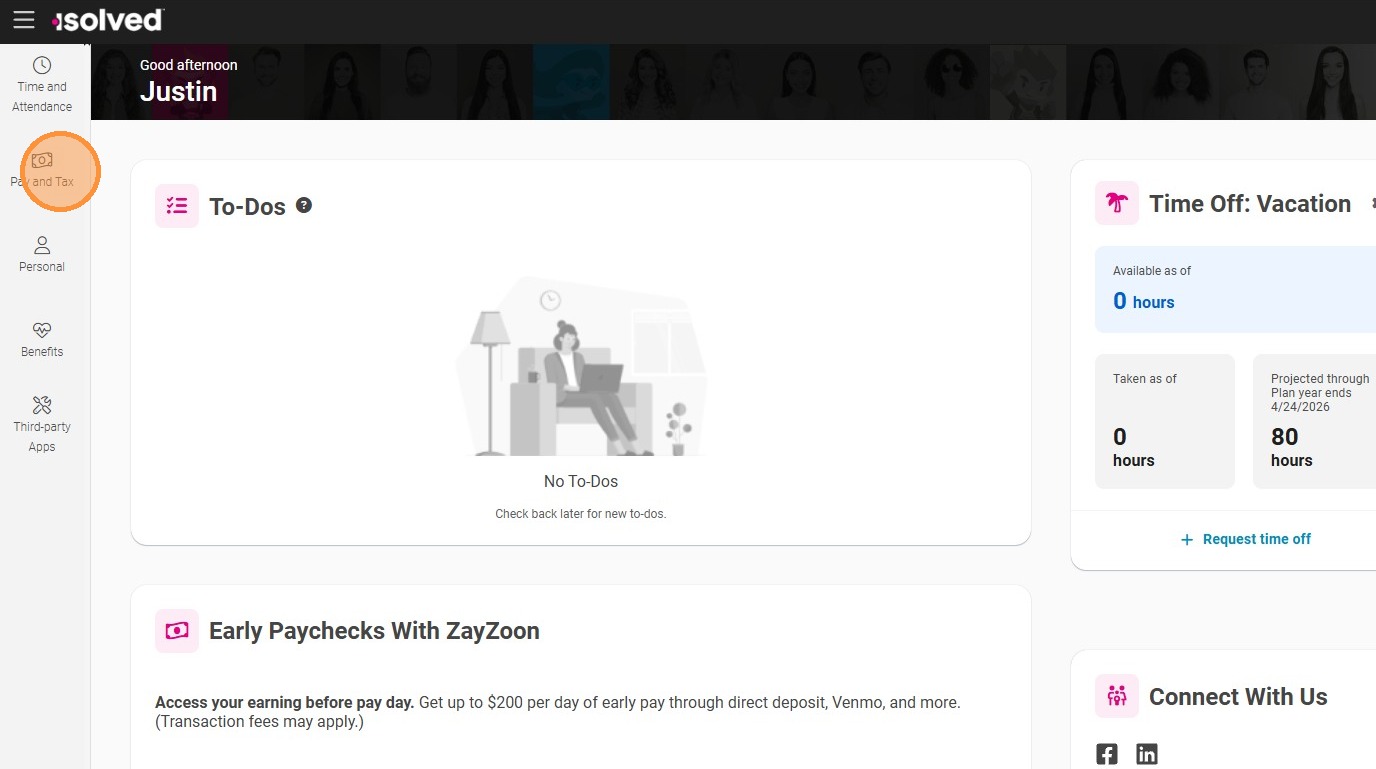
**Step 1.** Click **Pay and Tax**.
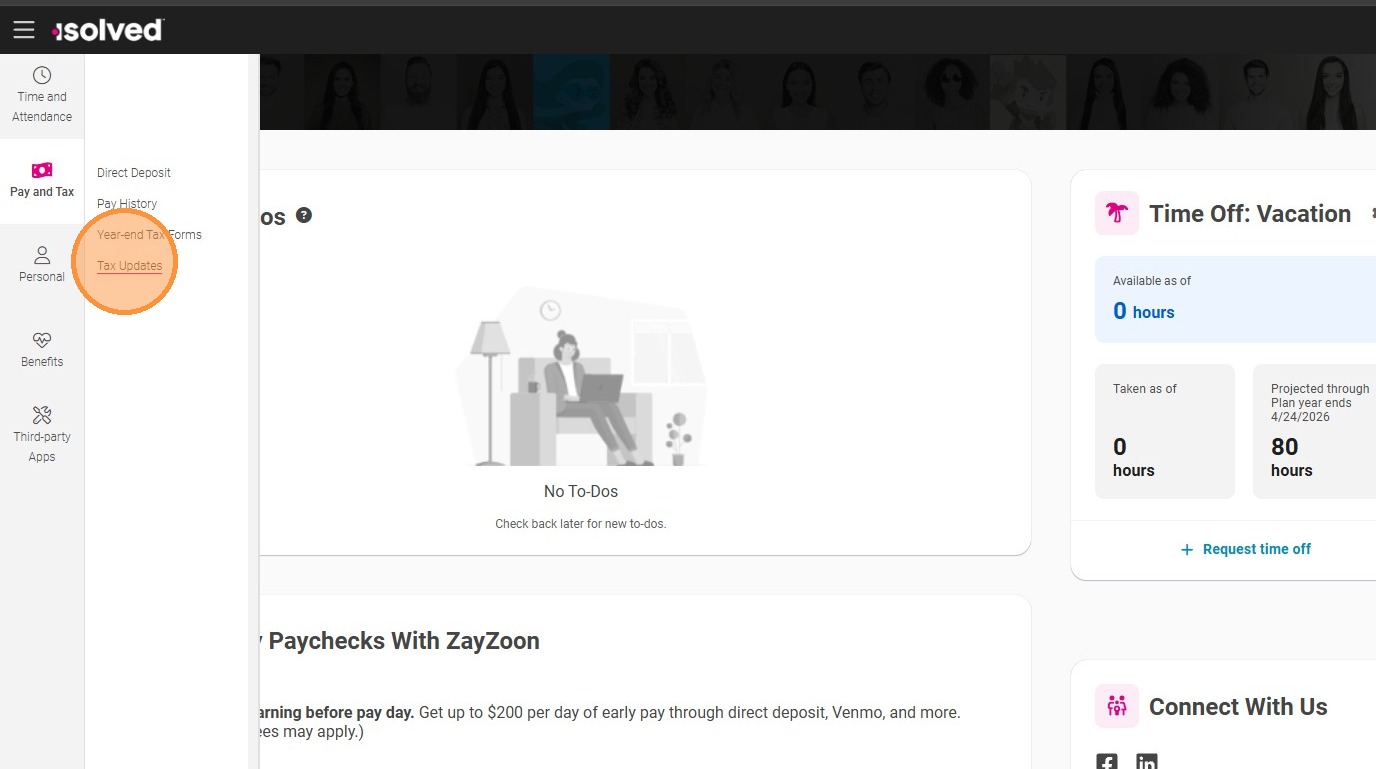
**Step 2.** Click **Tax Updates**.
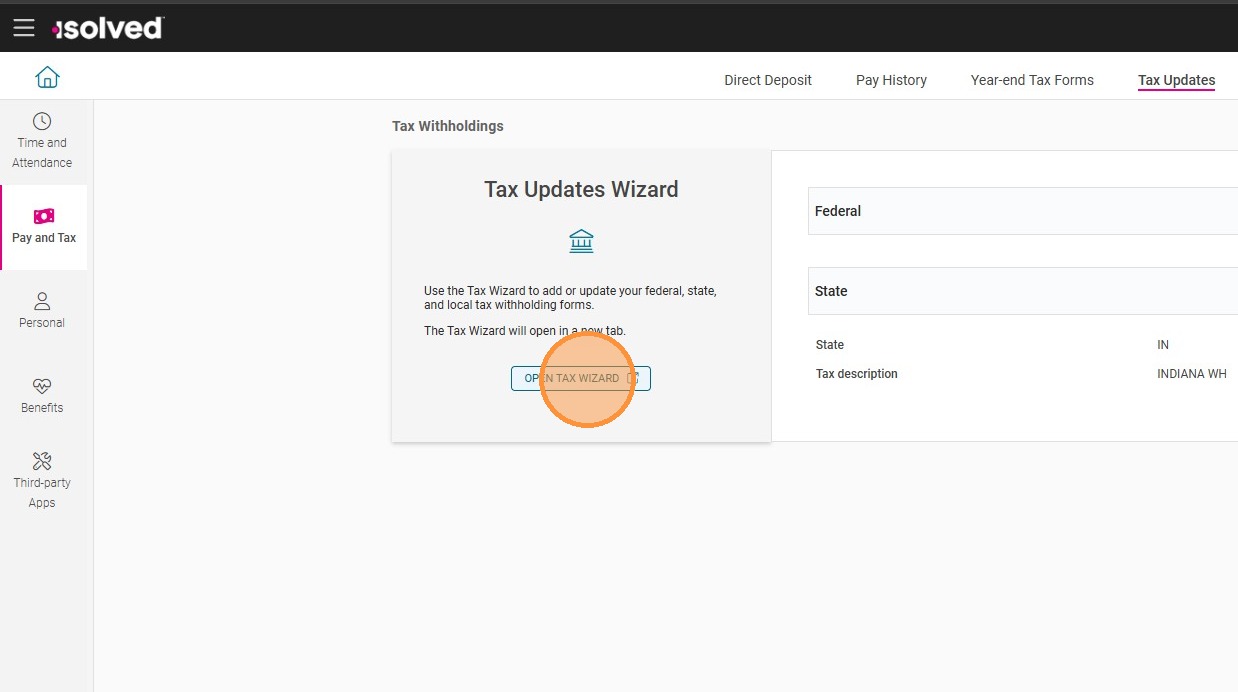
**Step 3.** Click **Open Tax Wizard**.
- [Employee](https://resources.candoorhcm.com/help-center/employee?hsLang=en#main-content)
- [Employee Self Service](https://resources.candoorhcm.com/help-center/employee?hsLang=en#employee-self-service)
- [Time](https://resources.candoorhcm.com/help-center/employee?hsLang=en#time)
- [Employer](https://resources.candoorhcm.com/help-center/employer?hsLang=en)
- [Supervisor / Manager](https://resources.candoorhcm.com/help-center/supervisor-manager?hsLang=en#main-content)
- [Manage Employees](https://resources.candoorhcm.com/help-center/supervisor-manager?hsLang=en#manage-employees)
- [Timeclocks](https://resources.candoorhcm.com/help-center/supervisor-manager?hsLang=en#timeclocks)
[](https://candoorhcm.com/)
[mailto:email@email.com](mailto:email@email.com)
Copyright © 2026, Candoor Payroll & HCM