---
title: Quick Start - iOS
description: "iOS Quick Start Instructions: How to save the iSolved Web App to your iOS phone's home screen"
---
[Skip to content](https://resources.candoorhcm.com/help-center/quick-start-ios#main-content)
English
Show submenu for translations
[More support](https://resources.candoorhcm.com/help-center/kb-tickets/new?hsLang=en)
[](https://resources.candoorhcm.com/help-center?hsLang=en)
- [Blog](https://blog.candoorhcm.com/)
- [Home](https://candoorhcm.com/)
- Solutions
Show submenu for Solutions
- [Payroll](https://candoorhcm.com/payroll/)
- [Tax Pay](https://candoorhcm.com/tax-pay/)
- [Time and Attendance](https://candoorhcm.com/time-attendance/)
- [Attract and Hire](https://candoorhcm.com/attract-hire/)
- [Employee Onboarding](https://candoorhcm.com/employee-onboarding/)
- [Employee Offboarding](https://candoorhcm.com/employee-offboarding/)
- [FAQs](https://candoorhcm.com/faqs/)
- [Forms and Tools](https://candoorhcm.com/forms-tools/)
Open main navigation
Close main navigation
- [Blog](https://blog.candoorhcm.com/)
- [Home](https://candoorhcm.com/)
- Solutions
Show submenu for Solutions
- [Payroll](https://candoorhcm.com/payroll/)
- [Tax Pay](https://candoorhcm.com/tax-pay/)
- [Time and Attendance](https://candoorhcm.com/time-attendance/)
- [Attract and Hire](https://candoorhcm.com/attract-hire/)
- [Employee Onboarding](https://candoorhcm.com/employee-onboarding/)
- [Employee Offboarding](https://candoorhcm.com/employee-offboarding/)
- [FAQs](https://candoorhcm.com/faqs/)
- [Forms and Tools](https://candoorhcm.com/forms-tools/)
- English
Show submenu for translations
- [More support](https://resources.candoorhcm.com/help-center/kb-tickets/new)
- [Contact us](https://candoorhcm.com/contact-candoor-payroll-hcm-services-lafayette-in/)
[Contact us](https://candoorhcm.com/contact-candoor-payroll-hcm-services-lafayette-in/)
How can we help you?
- There are no suggestions because the search field is empty.
1. [Candoor Payroll](https://resources.candoorhcm.com/help-center?hsLang=en)
2. [Employee](https://resources.candoorhcm.com/help-center/employee?hsLang=en)
3. [Employee Self Service](https://resources.candoorhcm.com/help-center/employee?hsLang=en#employee-self-service)
July 26, 2024
# Quick Start - iOS
## iOS User Quick Start
Once you have successfully registered, you can now save the isolved Web App to your phone's home screen. If you have not completed registration for employee self service, [please do so first.](https://support.candoorhcm.com/portal/en/kb/articles/how-do-i-setup-my-account?hsLang=en)
### Step 1
Open the web browser on your device and navigate to the [Candoor Employee Login](https://candoorhcm.myisolved.com/cloudservice).

### Step 2
Once logged in, you will be prompted at the bottom to install the app to your Home Screen. Tap the notification to open the install screen.

### Step 3
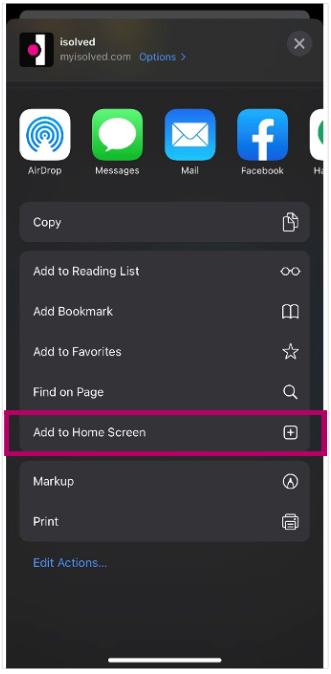
Select the "**Add to Home Screen**" link from the list of options.
### Step 4
The isolved "app" will be added to your mobile home screen for simplified access.

- [Employee](https://resources.candoorhcm.com/help-center/employee?hsLang=en#main-content)
- [Employee Self Service](https://resources.candoorhcm.com/help-center/employee?hsLang=en#employee-self-service)
- [Time](https://resources.candoorhcm.com/help-center/employee?hsLang=en#time)
- [Employer](https://resources.candoorhcm.com/help-center/employer?hsLang=en)
- [Supervisor / Manager](https://resources.candoorhcm.com/help-center/supervisor-manager?hsLang=en#main-content)
- [Manage Employees](https://resources.candoorhcm.com/help-center/supervisor-manager?hsLang=en#manage-employees)
- [Timeclocks](https://resources.candoorhcm.com/help-center/supervisor-manager?hsLang=en#timeclocks)
[](https://candoorhcm.com/)
[mailto:email@email.com](mailto:email@email.com)
Copyright © 2026, Candoor Payroll & HCM